Comments by MadHatter
7 comments

I'll try 1024x768 and if doesn't work I'll fix it. Any other bugs/requests you find, just call 'em out and I'll see what I can do.
No, it should just auto detect your display. The 1280x1024 restraint is no longer relevant, and is only mentioned in the outdated readme in the zip file. Read the newer readme instead (dated 4/5/09).
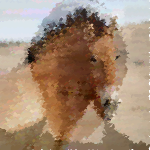
An example image. I selected the line tool, thickened the pen a little, and then ran:
-image alda.tga -image2 horse.tga -crossfade .7 -jigfactor 5 -stepx 2 -stepy 3 -uselines

Very cool. I'll be adding more features to it as time allows. I need to add a jpg reader, as this TGA stuff isn't cutting it.
One thing to note is that you can speed up your drawing times tremendously by using the -stepx and -stepy commands. Make sure you use a thicker pen/brush to make up for the increased stepx/y , otherwise you'll get holes in your final image.
Sure, see profile.
C++ source will be included, ya!
Right now the tool is pegged to 1280x1024 or 1280x800, but a few mods to the code will allow it to do any resolution.
Last one for a while. I'll release the tool soon.